

Our Most Popular Everyday Account
Everyday Options Account
An everyday transaction account with $0 monthly account keeping fees§ and awesome benefits, including cashback with Feel Good Rewards.
Features & benefits


Open now in under 5 minutes
Banking you can feel good about
Earn cashback with Feel Good Rewards
Together, Suncorp Bank customers have earned $1 million cashback. Join the cashback revolution.
Feel Good Rewards has great deals on some of Australia’s favourite brands. It’s easy: just make an eligible purchase# with an eligible Suncorp Bank Visa Debit card‡ .You can earn cashback at participating retailers, restaurants and more. No scanning, promo codes or special app needed.

Your security is our top priority
We go to great lengths to help keep your money safe online.
Suncorp Bank applies a range of security measures to keep your personal information safe. We use security options such as real-time fraud monitoring, secure encryption and 2-factor authentication.

Banking you can feel good about
Earn cashback with Feel Good Rewards
Get cashback on exciting retail and dining offers. No promo code or special app needed.
Feel Good Rewards has great deals on some of Australia’s favourite brands. It’s easy: just make an eligible purchase# with an eligible Suncorp Bank Visa Debit card.‡ You can earn cashback at participating retailers, restaurants and more.
Your security is our top priority
We go to great lengths to help keep your money safe online.
Suncorp Bank applies a range of security measures to keep your personal information safe. We use security options such as real-time fraud monitoring, secure encryption and 2-factor authentication.
Fast, secure and easy access to your money with the Suncorp Bank App


Fast, secure and easy access to your money with the Suncorp Bank App

Move your money
Transfer funds, pay bills and set up recurring payments, including BPAY® and Osko fast payments.++
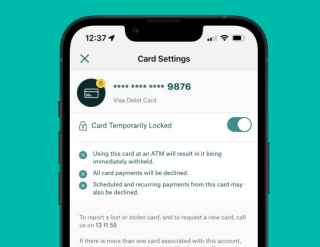
Stay in control
Instantly lock and unlock your Visa Debit card if you misplace it.
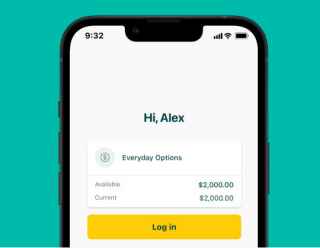
Log in quickly and securely
Use Touch ID, Face IDß or a 4-digit PIN.
Budget better with Sub-Accounts
With an Everyday Options Account, you can open up to 9 Sub-Accounts to help you keep track of your money. Use your Sub-Accounts to save for that holiday, new car, home deposit, or whatever else has caught your eye.


Budget better with Sub-Accounts
With an Everyday Options Account, you can open up to 9 Sub-Accounts to help you keep track of your money. Use your Sub-Accounts to save for that holiday, new car, home deposit, or whatever else has caught your eye.


Open an account online in minutes


Verify your identity
To speed through your application, verify your identity online. Just have your driver licence or Australian passport handy.

Add to your digital wallet
Once approved, you can add your Visa Debit card to your phone’s digital wallet instantly.
Want to give your savings a boost?
- You can open a Suncorp Bank Growth Saver Account and an everyday account.
- Like our everyday accounts, our Growth Saver Account has no monthly account keeping fees.
- You'll have one account to manage your everyday banking and another to help you achieve your saving goals.
- Plus, you can manage both your saving and spending in the Suncorp Bank App.
IRM{gsdep.4.1}1
Earn IRM{gsdep.4.1} bonus interest each month1 you grow your net balance by $200 or more (excluding interest) and make no more than one withdrawal.*
Fees
No monthly account keeping fees.
Foreign currency conversion fee on purchases online and overseas†
0%
Unlimited fee-free transfers
Our Everyday Options account with linked Sub-Account option offers unlimited fee-free Suncorp Bank transactions. To withdraw cash from a Sub-Account, simply transfer your funds into your Everyday Options main account
ATM Fees
Suncorp Bank customers can access fee-free¢ cash withdrawals and balance enquiries at Suncorp Bank and atmx ATMs Australia-wide. You can also access the big four banks’ ATMs fee-free. Withdrawals and enquiries at other ATMs will incur the ATM operator fee by the financial institution who owns the ATM. This fee will be charged immediately at the time of the transaction to your Everyday Options main account.
Frequently asked questions
Still have questions:
You can deposit money into your account by cash at any of our Smart ATMs around Australia, or transfer money into your account digitally using Suncorp Bank App, Internet and telephone banking.
You can easily import your regular transfers from your old bank account into your new Suncorp Bank account, using our free self-service Suncorp Bank Account Switching tool. You can also set up regular, recurring payments is easy and can be done at any time through Internet Banking or the Suncorp Bank App.
You can update your address, email and mobile phone number through the Suncorp Bank App or Internet Banking:
To update your address, email and mobile number via the Suncorp Bank App:
- Log into the App and tap ‘More’ in the menu bar.
- Select 'Profile', then tap on the mobile, email or address options and follow the prompts to update.
To update your address, email and mobile number via Internet Banking:
- Log into Internet Banking and click ‘Customer Profile’ from the left-hand menu.
- Click on the mobile, email or address options and follow the prompts to update.
To change the name on your account, for example, because of marriage or divorce, you’ll need to follow the steps required by your state or territory’s Registry of Births Deaths and Marriages first. Once you’ve done that, you’ll then need to submit your change of name documentation in person at any Suncorp Bank branch.
Here’s where you can get more information on what’s required from your state or territory:
Yes. You are liable for any Direct Debit you authorised, including a direct debit which causes your account to overdraw.
If you are wishing to stop or cancel a direct debit from being processed to your account, please contact us or visit us at any branch. We also suggest contacting the direct debit user.
To close a personal transaction account, savings account or any sub-account via the Suncorp Bank App:
- Log into the Suncorp Bank App.
- Tap ‘More’ in the menu bar, then select ‘Accounts’.
- Select 'Close Account'.
- Choose the account you'd like to close, and follow the prompts.
Alternatively, to close your account(s) you can either:
- Send a secure message through Internet Banking. Find out how to send a secure message.
- Contact us.
- Visit your nearest branch. Be sure to bring ID.
Before we close your account, we’ll need to confirm that all your direct debits and credits, cheques (deposited prior to 14 February 2025) and visa authorisations, and other payments have cleared.
Some accounts that are packaged with an eligible Suncorp Bank home loan and some business accounts may need to be closed in a Suncorp Bank branch.
More information on closing accounts:
You can open a sub-account and add it to your existing Everyday Options Account easily through Internet Banking or the Suncorp Bank App.
To add a sub-account through the Suncorp Bank App:
- Log in and tap ‘+ New account’ under the 'Accounts' section.
- Select ‘Everyday Accounts’, then 'Everyday Options Sub-Account'.
- Tap ‘Open now’ and follow the prompts.
To add a sub-account through Internet Banking:
- Log in and select ‘Open new account/loan’ from the left-hand menu.
- Click on the ‘Everyday Accounts’ tile.
- Scroll down to the ‘Everyday Options Sub-Account’ section and click ‘Add Sub-Account’.
- Follow the prompts and select how many sub-accounts you’d like to open and name away!
For existing joint account holders who wish to open an Everyday Options Sub Account in the same names, only one party is required to apply.
You can pay bills directly from your sub-accounts via BPAY or direct debit. You’ll just need to set up a recurring payment from your chosen sub-account.
To set up a recurring payment via Internet Banking:
- Log into Internet Banking and select ‘BPAY® – Pay Bills’.
- Select ‘New BPAY® Payment’.
- Select the ‘From’ account.
- Either select from the Frequent Billers drop down or enter the BPAY Bill Code and Customer Reference.
- Enter the payment amount.
- Under ‘Timing’, choose ‘Recurring payment’, then set the frequency and start/expiry dates.
- Review and click ‘Next’ to confirm.
To set up a recurring transfer via the Suncorp Bank App:
- Log in and tap on the ‘Transfer’ icon in the menu bar, then select BPAY as the ‘Payment Option’.
- Select the account you’d like to pay from and then tap ‘BPAY Biller’.
- Choose from either an existing Biller or select ‘Add New’ and enter their details.
- Type in the amount, select ‘When’ and then tap ‘Recurring’.
- Choose your frequency, start date and if required, end date.
- Select ‘Next’ to confirm and process BPAY.
It’s important to note that funds may take up to 48 hours to reach the debitor.
You can rename your main Everyday Options account and any sub-accounts easily through Internet Banking in the ‘Manage Accounts & Cards’ section. You can also do so through the Suncorp Bank App.
To rename your main account and any sub-accounts through Internet Banking:
- Log in and select ‘Manage Account and Cards' on the left-hand menu.
- Go to the ‘My Bank Accounts’ section where there will be a ‘Designated name’ column.
- Click on the ‘Change’ button next to the main account or sub-account you want to rename.
- Type your new name into the empty field and select the green tick.
To rename your main account and any sub-accounts through the Suncorp Bank App:
- Login to the Suncorp Bank App's Accounts tab.
- Click on the main account or sub-account that you want to rename.
- Click on the '...' next to the account name and select 'Edit Account Name'.
- Enter the new account name and click 'OK’.
Put simply, the more money you're able to save, the less interest you'll end up paying on your home loan. For more in-depth information, please visit the Suncorp Bank Offset page.
Australia and New Zealand Banking Group Limited (ABN 11 005 357 522) (ANZ) acquired Norfina Limited (ABN 66 010 831 722 (Suncorp Bank) on 31 July 2024. As Suncorp Bank is now part of the ANZ Group, it may be necessary to vary the terms of your Suncorp Bank product to match the terms of a similar ANZ product. This means you may end up with a product that has different terms and features to those you initially applied for. In any event, Suncorp Bank will provide you with a more detailed notice of these changes if the variation applies to your products. A full list of these changes for each product can be found at suncorpbank.com.au/variation. Please contact us if you have any questions or if there is a feature that is important to you.
Home Loan, Personal and Business Banking products are issued by Suncorp Bank (Norfina Limited ABN 66 010 831 722 AFSL No 229882 Australian Credit Licence 229882) to approved applicants only. Eligibility criteria, conditions, fees and charges apply and are available on request. Please read the relevant Product Information Document and terms and conditions before making any decisions about whether to acquire a product.
† A Suncorp Bank Visa Debit Card is required. Suncorp Bank Visa Debit Cards are not available to overseas residents, Trustee accounts, accounts where the number to sign to operate is two or more (no form of card access is allowed) or a child under the age of 11. Suncorp Bank Visa Debit Cards must have an account linked as Primary Credit Relationship. Each customer may only have one Suncorp Bank Visa Debit Card per Primary Credit account.
To be eligible for a Suncorp Bank Visa Debit Card you must be 11 years of age or older. For Visa Debit Cards issued to customers aged 11-15 years of age, we will (where possible) block purchases from merchants using the following Merchant Category Codes: Dating Services (7273), Massage Parlours (7297), Gambling Transactions (7995), Government-Owned Lotteries (Non-U.S. region) (9406), Government-Owned Lotteries (U.S. Region only) (7800), Government Licensed Casinos (Online Gambling) (7801), Government Licensed Horse/Dog Racing (U.S. Region only) (7802), Direct Marketing - Outbound Telemarketing Merchants (5966), Direct Marketing - Inbound Telemarketing Merchants (5967).
++Osko fast payments can only be made to a PayID or to the BSB and account number of an Osko enabled account at another Osko participating financial institution via the Suncorp Bank App, Internet Banking or by visiting a Suncorp Bank branch. Osko fast payments cannot be made from or to Passbook accounts, loan accounts (other than line of credit and overdraft facilities), Farm Management Deposit Accounts and Fixed Term Deposits. Osko fast payments cannot be made from Kids Savings Accounts, Agent’s Statutory Trust Accounts (QLD, NSW) and Solicitor’s Trust Accounts (QLD) but can be made to them. Staff assisted Osko fast payments cannot be made in branch from Everyday Options Sub-Accounts, Business Saver Accounts or eOptions Accounts. Payments from an Account which requires 2 or more persons to sign to withdraw, future-dated and recurring payments and Business Payment Credits will not be made as an Osko fast payment. For full details about terms and restrictions that apply to Osko fast payments please read our Terms and Conditions for Suncorp Bank Accounts and Continuing Credit Accounts and the Product Information Document applicable to your account.
‡ An Eligible Card is a Suncorp Bank Visa Debit Card linked to Suncorp Bank personal transaction account (“Eligible Account”) for customers aged 18 or over. An Eligible Account does not include Suncorp Bank Growth Saver Account or Kids Savings Account.
ß Face ID login is available on the iPhone X and later models. Please refer to our Mobile Banking/Suncorp Bank App terms and conditions before using.
Foreign Exchange Products are issued by Suncorp Bank (Norfina Limited) ABN 66 010 831 722 AFSL No 229882. Please read the relevant Product Disclosure Statement or Product Information Document, the Financial Services Guide, and our Treasury terms and conditions before you make any decisions regarding any of these products. Contact us for a copy.
¢ Suncorp Bank is a member of the atmx by Armaguard (atmx) ATM Network. The deposit is taken by Armaguard on behalf of Suncorp Bank (Norfina Limited ABN 66 010 831 722 AFSL No 229882) at all atmx ATMs. Fee-free access applies to the following transactions: a successful cash withdrawal, account balance enquiry, PIN change, transfer between Suncorp Bank accounts, or a cash deposit using a Suncorp Bank Visa Debit Card. Daily withdrawal limits apply. Deposit up to 90 notes per transaction. Cheques deposits are not accepted at atmx ATMs for Suncorp Bank Customers. Terms and conditions apply. Find out more on our Suncorp Bank ATMs page.
#An eligible purchase is one completed via the Visa network with your eligible card, that satisfies the terms and conditions associated with each offer as provided by each participating merchant from time to time. You can choose the Visa network when prompted to do so, or selecting "credit” when completing a debit card transaction or using Visa payWave. Purchases made using an online payment platform (such as PayPal) are not eligible, even when an eligible card is linked to that online payment platform.
§ The features and fees listed on this page apply to the following accounts: Everyday Options Account and Everyday Essentials Account. Other Suncorp Bank accounts, including those account types which are no longer for sale, may have different fees and features to the accounts shown here. Please contact us or check the relevant schedule of fees and charges for more information.
1.
* If you need to make more than one withdrawal, you’ll still receive the standard variable interest rate.
Apple, the Apple logo, Apple Pay and iPhone are trademarks of Apple Inc., registered in the U.S. and other countries and regions.
App Store is a service mark of Apple Inc.
Google Wallet, The Google Wallet logo, Google Pay, The Google Pay logo, Google Play and the Google Play logo are trademarks of Google LLC.
Android is a trademark of Google LLC.
The Canstar 2024-2025 Outstanding Transaction Accounts Awards were received in April 2024 and April 2025. The award recognises financial institutions that provide outstanding value to Australian consumers through their suite of savings and transaction products. Suncorp Bank products assessed included: The Everyday Essentials Account and Everyday Options Account. For more information on Canstar awards, go to https://www.canstar.com.au/star-ratings-awards/savings-and-transaction-account.
The Mozo 2024 Experts Choice Award for Exceptional Everyday Account was received in April 2024 for Suncorp Bank Everyday Options Account. For more information on Mozo’s awards, go to https://mozo.com.au/expertschoice/bank-accounts.
