

Basic Everyday Bank Account
Everyday Essentials Account
An everyday transaction account with no monthly account keeping fees and features designed for concession card holders.

What you get with our Everyday Essentials transaction account
Is this the right account for you?
An Everyday Essentials Account could be right for you if you’re:
If this doesn’t sound like you, check out our
Banking you can feel good about

Cashback on fashion, travel, dining and more
With Feel Good Rewards you can score cashback with some of Australia’s biggest brands, when using your eligible Suncorp Bank Visa Debit card.‡

Your security is our top priority
We take security seriously, helping keep your money safe online with features like two-factor authentication and 24/7 fraud monitoring.

Bank your way
Use your Visa Debit card†, the Suncorp Bank App or visit a branch, there are so many ways to access your money.
Easy access to your money with the Suncorp Bank App
Log in quickly and securely
Use Touch ID, Face IDß or a 4-digit PIN.
Move your money
Transfer funds, pay bills and set up recurring payments, including BPAY® and Osko fast payments.++
Stay in control
Instantly lock and unlock your Visa Debit card if you misplace it.



Open a bank account online in minutes
New to Suncorp Bank?
Opening an Everyday Essentials account with our easy online application should only take about 5 minutes.
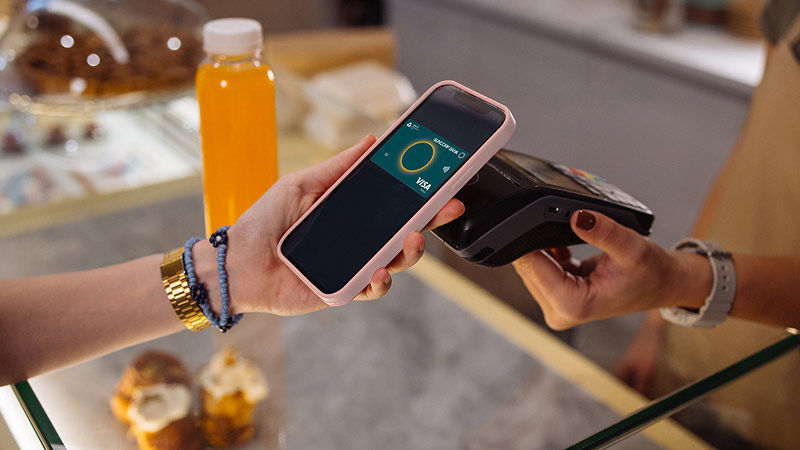
Add to your digital wallet
Once approved, you can add your Visa Debit card to your phone’s digital wallet instantly.
Rates & Fees
Fees
- no monthly account keeping fees
- no Overdraft Fees£
- no foreign currency conversion fee on purchases online and overseas†
- unlimited fee-free transfers for Suncorp Bank transactions
- fee-free cash withdrawals and balance enquiries at Suncorp Bank, atmx and big four banks' ATMs.¢
Interest Rates
There's no interest paid on money in this account however, if you're saving for a goal and would like to earn interest, you may also like to open a Savings Account.
Frequently asked questions
Still have questions:
You can deposit money into your account by cash at any of our Smart ATMs around Australia, or transfer money into your account digitally using Suncorp Bank App, Internet and telephone banking.
You can easily import your regular transfers from your old bank account into your new Suncorp Bank account, using our free self-service Suncorp Bank Account Switching tool. You can also set up regular, recurring payments is easy and can be done at any time through Internet Banking or the Suncorp Bank App.
You can update your address, email and mobile phone number through the Suncorp Bank App or Internet Banking:
To update your address, email and mobile number via the Suncorp Bank App:
- Log into the App and tap ‘More’ in the menu bar.
- Select 'Profile', then tap on the mobile, email or address options and follow the prompts to update.
To update your address, email and mobile number via Internet Banking:
- Log into Internet Banking and click ‘Customer Profile’ from the left-hand menu.
- Click on the mobile, email or address options and follow the prompts to update.
To change the name on your account, for example, because of marriage or divorce, you’ll need to follow the steps required by your state or territory’s Registry of Births Deaths and Marriages first. Once you’ve done that, you’ll then need to submit your change of name documentation in person at any Suncorp Bank branch.
Here’s where you can get more information on what’s required from your state or territory:
Yes. You are liable for any Direct Debit you authorised, including a direct debit which causes your account to overdraw.
If you are wishing to stop or cancel a direct debit from being processed to your account, please contact us or visit us at any branch. We also suggest contacting the direct debit user.
To close a personal transaction account, savings account or any sub-account via the Suncorp Bank App:
- Log into the Suncorp Bank App.
- Tap ‘More’ in the menu bar, then select ‘Accounts’.
- Select 'Close Account'.
- Choose the account you'd like to close, and follow the prompts.
Alternatively, to close your account(s) you can either:
- Send a secure message through Internet Banking. Find out how to send a secure message.
- Contact us.
- Visit your nearest branch. Be sure to bring ID.
Before we close your account, we’ll need to confirm that all your direct debits and credits, cheques (deposited prior to 14 February 2025) and visa authorisations, and other payments have cleared.
Some accounts that are packaged with an eligible Suncorp Bank home loan and some business accounts may need to be closed in a Suncorp Bank branch.
More information on closing accounts:
Australia and New Zealand Banking Group Limited (ABN 11 005 357 522) (ANZ) acquired Norfina Limited (ABN 66 010 831 722) (Suncorp Bank) on 31 July 2024. As Suncorp Bank is now part of the ANZ Group, it may be necessary to vary the terms of your Suncorp Bank product to match the terms of a similar ANZ product. This means you may end up with a product that has different terms and features to those you initially applied for. In any event, Suncorp Bank will provide you with a more detailed notice of these changes if the variation applies to your products. A full list of these changes for each product can be found at suncorpbank.com.au/variation. Please contact us if you have any questions or if there is a feature that is important to you.
Home Loan, Personal and Business Banking products are issued by Suncorp Bank (Norfina Limited ABN 66 010 831 722 AFSL No 229882 Australian Credit Licence 229882) to approved applicants only. Eligibility criteria, conditions, fees and charges apply and are available on request. Please read the relevant Product Information Document and terms and conditions before making any decisions about whether to acquire a product.
† A Suncorp Bank Visa Debit Card is required. Suncorp Bank Visa Debit Cards are not available to overseas residents, Trustee accounts, accounts where the number to sign to operate is two or more (no form of card access is allowed) or a child under the age of 11. Suncorp Bank Visa Debit Cards must have an account linked as Primary Credit Relationship. Each customer may only have one Suncorp Bank Visa Debit Card per Primary Credit account.
To be eligible for a Suncorp Bank Visa Debit Card you must be 11 years of age or older. For Visa Debit Cards issued to customers aged 11-15 years of age, we will (where possible) block purchases from merchants using the following Merchant Category Codes: Dating Services (7273), Massage Parlours (7297), Gambling Transactions (7995), Government-Owned Lotteries (Non-U.S. region) (9406), Government-Owned Lotteries (U.S. Region only) (7800), Government Licensed Casinos (Online Gambling) (7801), Government Licensed Horse/Dog Racing (U.S. Region only) (7802), Direct Marketing - Outbound Telemarketing Merchants (5966), Direct Marketing - Inbound Telemarketing Merchants (5967).
£ Some transactions which may cause the account to become overdrawn include fees and other transactions that occur when Suncorp Bank is processing offline. If your account becomes overdrawn and has a negative balance we will not charge overdrawn fees or interest on the Everyday Essentials Account.
‡ An Eligible Card is a Suncorp Bank Visa Debit Card linked to Suncorp Bank personal transaction account (“Eligible Account”) for customers aged 18 or over. An Eligible Account does not include Suncorp Bank Growth Saver Account or Kids Savings Account.
¢ Suncorp Bank is a member of the atmx by Armaguard (atmx) ATM Network. The deposit is taken by Armaguard on behalf of Suncorp Bank (Norfina Limited ABN 66 010 831 722 AFSL No 229882) at all atmx ATMs. Fee-free access applies to the following transactions: a successful cash withdrawal, account balance enquiry, PIN change, transfer between Suncorp Bank accounts, or a cash deposit using a Suncorp Bank Visa Debit Card. Daily withdrawal limits apply. Deposit up to 90 notes per transaction. Cheques deposits are not accepted at atmx ATMs for Suncorp Bank Customers. Terms and conditions apply. Find out more on our Suncorp Bank ATMs page.
ß Face ID login is available on the iPhone X and later models. Please refer to our Mobile Banking/Suncorp Bank App terms and conditions before using.
++Osko fast payments can only be made to a PayID or to the BSB and account number of an Osko enabled account at another Osko participating financial institution via the Suncorp Bank App, Internet Banking or by visiting a Suncorp Bank branch. Osko fast payments cannot be made from or to Passbook accounts, loan accounts (other than line of credit and overdraft facilities), Farm Management Deposit Accounts and Fixed Term Deposits. Osko fast payments cannot be made from Kids Savings Accounts, Agent’s Statutory Trust Accounts (QLD, NSW) and Solicitor’s Trust Accounts (QLD) but can be made to them. Staff assisted Osko fast payments cannot be made in branch from Everyday Options Sub-Accounts, Business Saver Accounts or eOptions Accounts. Payments from an Account which requires 2 or more persons to sign to withdraw, future-dated and recurring payments and Business Payment Credits will not be made as an Osko fast payment. For full details about terms and restrictions that apply to Osko fast payments please read our Terms and Conditions for Suncorp Bank Accounts and Continuing Credit Accounts and the Product Information Document applicable to your account.
#An eligible purchase is one completed via the Visa network with your eligible card, that satisfies the terms and conditions associated with each offer as provided by each participating merchant from time to time. You can choose the Visa network when prompted to do so, or selecting "credit” when completing a debit card transaction or using Visa payWave. Purchases made using an online payment platform (such as PayPal) are not eligible, even when an eligible card is linked to that online payment platform.
ƒ flexiRates allows you to earn higher interest rates by locking away a portion of your savings within your account for periods up to 12 months. flexiRates can only be opened and accessed online.
Apple, the Apple logo, Apple Pay and iPhone are trademarks of Apple Inc., registered in the U.S. and other countries and regions.
App Store is a service mark of Apple Inc.
Google Wallet, The Google Wallet logo, Google Pay, The Google Pay logo, Google Play and the Google Play logo are trademarks of Google LLC.
Android is a trademark of Google LLC.
